Add www.lelong.com.my To Trusted Sites
Steps to Add lelong.com.my To Trusted Sites
Your Microsoft Internet Explorer browsing security level most likely is set
to High at the moment.
Thus, you can’t
browse http://www.lelong.com.my properly.
Please follow the following instructions in order to browse http://www.lelong.com.my properly :
To add a Web site to your list of trusted sites:
|
1. |
On the Internet Explorer Tools menu, click Internet Options. |
|
2. |
In the Internet Options dialog box, click the Security tab. |
|
3. |
Click the Trusted sites icon, and then click the Sites button. |
|
4 |
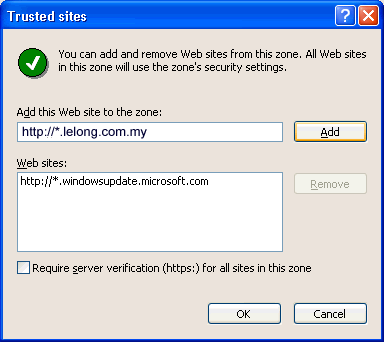
In the Trusted sites dialog box, enter the Web site URL ( http://*.lelong.com.my
) |
|
5. |
Clear (uncheck) the Require server verification (https:)
for all sites in this zone checkbox. Trusted site added. |
|
6. |
Click OK. |
|
7. |
Under Security level for this zone, move the slider to Medium. This sets the security level for all of the sites that you trust to Medium. (If no slider is visible, click the Default Level button and then move the slider up to Medium.) |
|
8. |
If all the above still not working. You can try our simplified version. |